Create a Product
Create a product and price plans
A product represents the software you sell. When you create a product, choose a name and product type. The product name becomes the main title on the selling landing page; you can change it later during landing page setup.

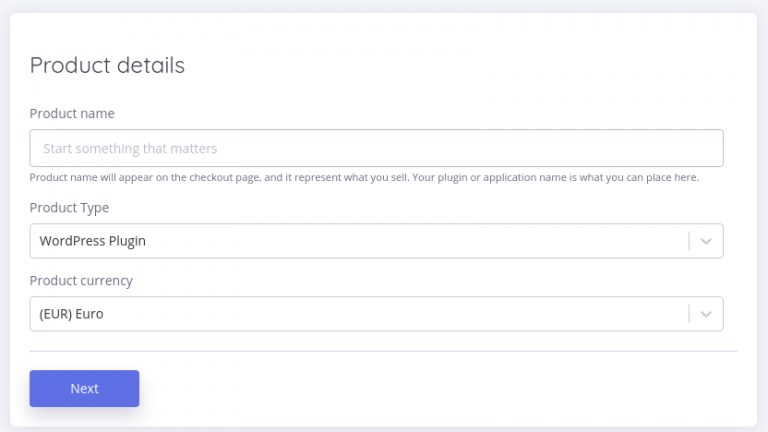
Choose the product type that matches your needs:
- WordPress Plugin
- WordPress Theme (coming soon)
- Digital Download (coming soon)
One product represents one software product. WordPress Plugin and WordPress Theme products support Git deployment to WordPress. Use Digital Download when customers should download your product after purchasing a license—for example, when selling an e-book.
Price plans
In the next step, create price plans. A price plan defines a pricing package for your product. Plans can be recurring or lifetime.
Recurring plans bill every month or every year until the customer cancels the license.
Lifetime plans charge once; the customer can use your product forever and the license never expires.

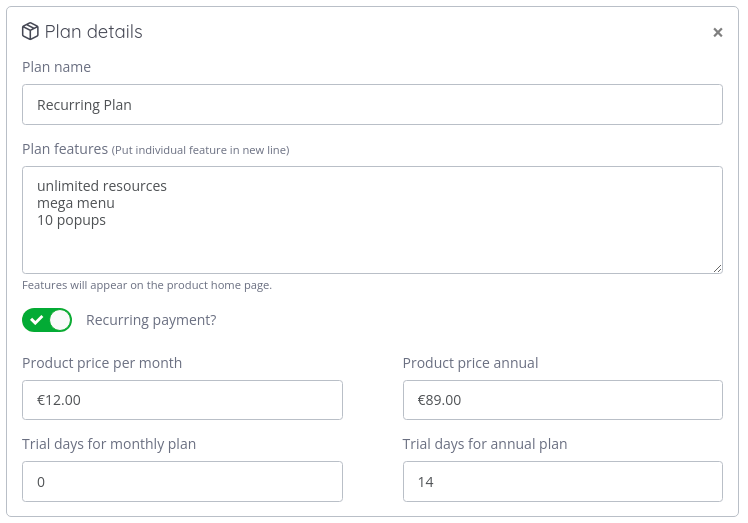
Recurring payment plans
Recurring plans suit WordPress plugins you develop and update over time. One recurring plan can include both monthly and yearly prices. To offer only monthly or only yearly billing, set the unwanted price to zero.
Lifetime plan
For many digital products, a one-time payment is the right choice. The customer pays once and keeps access forever. Lifetime plans work for WordPress plugins and themes too—customers receive updates for as long as you publish them.
Trial periods
For any plan, you can add a trial period in days so customers can try the product before being charged. When the trial ends, the payment provider charges the customer.
If there is no trial period, the customer is charged immediately at purchase.
Pricing plans auto-creation with payment providers
If you connect Stripe, PayPal, or Paddle when creating a product, License Bridge also creates matching prices on those providers. To learn how this works, see price plans auto-creation.