Add Licensing and Checkout to Your WordPress Plugin — Start Free
You already built the plugin. License Bridge adds the license keys, the checkout, and the automatic updates so you can take your first payment.
For developers selling their own WordPress plugins. Not a marketplace. Free plan: 1 product, 10 licenses, 5,000 API calls per month. No credit card required.




Everything between “my plugin works” and “someone paid for it”
These are the five pieces you would otherwise build yourself before your first sale.
A product page with checkout included
You do not need a website, a shop, or a payment integration project to start selling.
Add your product and sell
Description, screenshots, video, plans. Connect a payment provider and the page is live.
Your payment account, your money
Stripe and PayPal pay you directly. License Bridge takes no percentage of your sales on any provider. Your payment provider still charges its own processing fees.
Or sell inside wp-admin
The WordPress SDK can open a billing form and card entry inside the dashboard, so customers never leave WordPress.
A page search engines can read
Your hosted product page is indexable, so people can find the plugin they are looking for.
Start free. Upgrade when you grow.
The free plan is enough to launch a product and make your first sales. Move to Starter when you need more room.
- 1 product
- 10 licenses
- 5,000 API calls per month
- Payment integration
- Git deployment
- WordPress automatic updates
No credit card required.
- 3 products
- 100 licenses
- 50,000 API calls per month
- Payment integration
- Git deployment
- WordPress automatic updates
Upgrade from the free plan whenever you need more.
What you get on day one
The parts of a plugin business you do not have to write
Licensing
Signed license keys, per-license credentials, and validation for WordPress plugins.
Payments
Stripe and Paddle for card payments, PayPal for redirect checkout. Recurring and one-time.
Automatic updates
Plugin update delivery through the native WordPress update mechanism, entitled by license.
Git deployment
GitHub and Bitbucket integration builds and stores your release package for you.
Checkout inside wp-admin
SDK 2.0 renders a billing modal in the dashboard and completes payment with Stripe or Paddle.
Nothing to host
No license server, no update server, no webhook handler, no VPS to patch.
Payment providers
Connect your payment provider to start selling
Stripe, Paddle and PayPal are supported. Connect your own account as part of getting your product ready to sell. Licensing, updates, and your SDK integration do not change if you switch later.


Stripe
Card payments straight to your own Stripe account, including card entry inside wp-admin. You are the seller.


Paddle
Your own Paddle Billing account, with Paddle as Merchant of Record handling the invoice and applicable tax. Paddle Billing (v2) only.


PayPal
Redirect checkout through your own PayPal account.
Stripe, Paddle and PayPal are independent payment companies and their names and logos are their own trademarks. License Bridge is an integration layer, not a partner, reseller, or agent of any of them.
One SDK connects your plugin to all of it
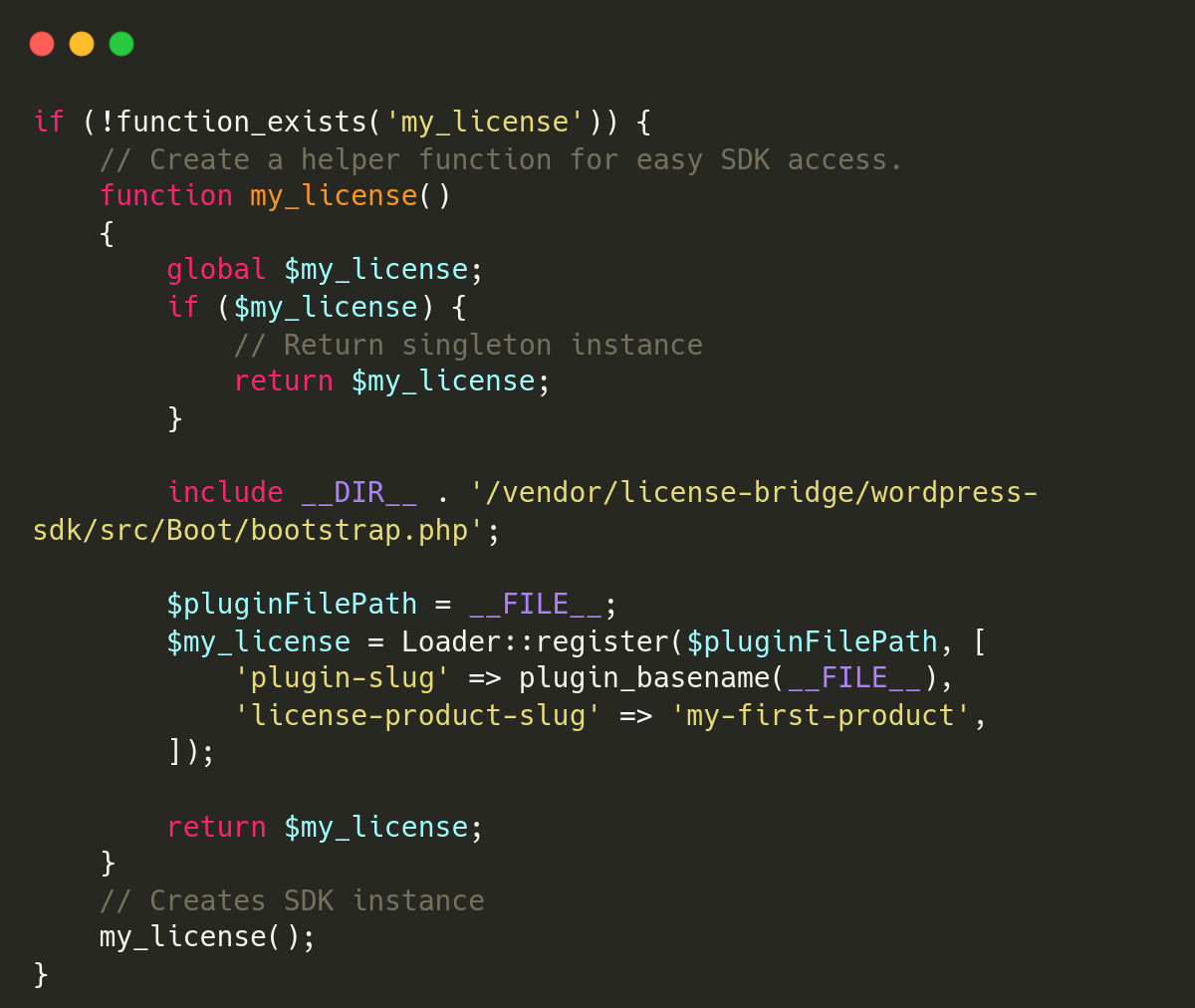
The WordPress SDK handles license storage and validation, the update check, the premium upgrade after purchase, and the in-dashboard checkout.
Customize setup snippet.
Customize setup snippet to make your SDK initialization unique and avoid collisions with other plugin or theme.
Replace license-product-slug with the product slug from the License Bridge dashboard.
Add License Bridge to your plugin with the WordPress SDK. The SDK handles license validation and update delivery so your plugin can check licenses and deliver premium updates without building that infrastructure yourself.

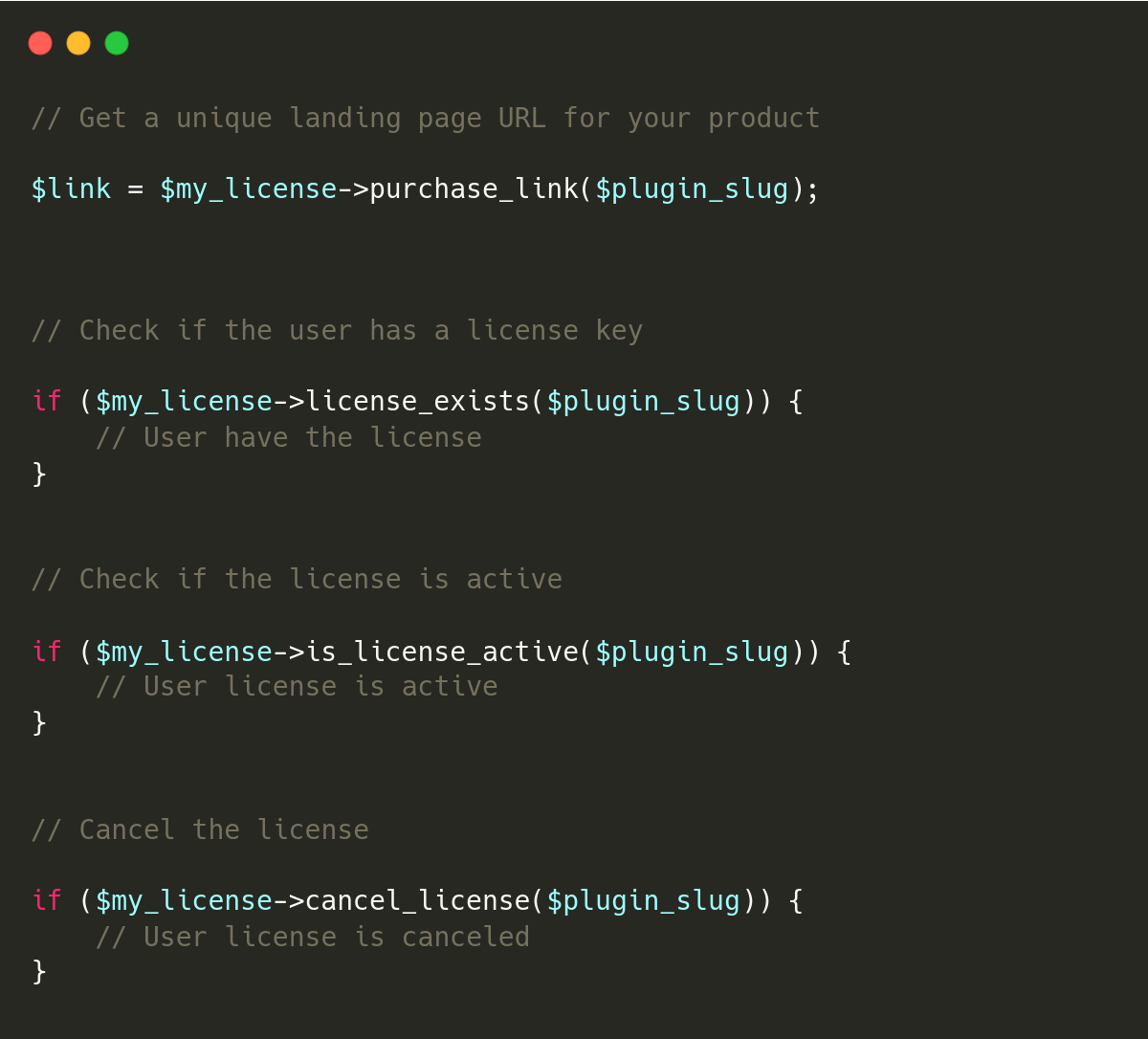
License validation and updates
Add License Bridge to your plugin with the WordPress SDK. The SDK handles license validation and update delivery so your plugin can check licenses and deliver premium updates without building that infrastructure yourself.

First questions, answered
Anything else? Email [email protected]
What developers ask before their first paid release:
Nothing. The free plan covers 1 product, 10 licenses, and 5,000 API calls per month, and does not ask for a card. Starter is $9/month when you need 3 products and 100 licenses.
No. You install the WordPress SDK, point it at your product slug, and it handles license storage, validation, and the update check. You can also call the API directly if you prefer.
To your own payment account. Stripe and PayPal pay you directly. If you use Paddle, Paddle is the Merchant of Record and pays out to your own Paddle account. License Bridge does not take a percentage on any of them. Your payment provider still charges its own processing fees.
Yes. After purchase, the SDK replaces the free version on the customer site with the premium build, so there is no manual download step.
Connect GitHub or Bitbucket. When you push a new version, licensed customers see the plugin update in the normal WordPress updates screen.
Not today. License Bridge does not track or enforce per-site activations, so we do not offer single-site or multi-site license tiers.